
In today’s digital world, a company’s success is closely connected to the safety and availability of its data. We all know that making backups is essential. But the most important question remains: how can you be certain that your backup will actually work during a real emergency?
When you need to fully test a virtual machine (VM), SureBackup avoids a slow, full restore by using a patented Veeam technology called vPower. The exact method is tailored to your hypervisor (ESXi and Hyper-V). In both cases, the result is the same: the hypervisor host can access the virtual disk files and power on the VM directly from the backup file inside a Virtual Lab safe, isolated network bubble.
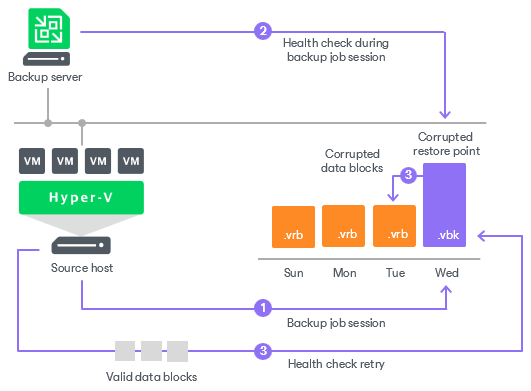
Backup File Integrity (CRC Check)
Before testing the content inside the backup, Veeam can first validate the health of the backup file itself. When you configure a SureBackup job, you have the option to perform a Cyclic Redundancy Check (CRC).
File-Level Security Scanning (No Boot Required)
This layer is specifically designed for security and data integrity checks. For these tasks, the VM does not need to be powered on. Instead, Veeam uses a Mount Server to make the files inside the backup readable. With the files now accessible, Veeam can perform powerful, file-level scans using a variety of tools:
Veeam Threat Hunter: Veeam’s own malware scanner uses an updated signature database to scan all the mounted files for known viruses and ransomware.
Third-Party Antivirus: You can point your preferred antivirus software (which is installed on the mount server) to the mounted backup to scan it with the engine you already trust.
YARA Rules: You can run scripts that use YARA rules to perform highly specific pattern matching, allowing you to hunt for targeted threats or custom malware inside the files of the offline backup.
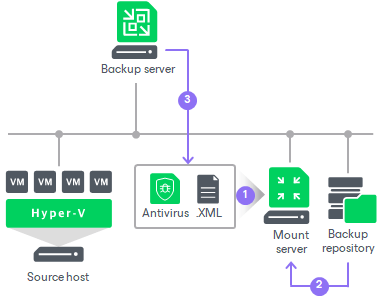
This layer answers the question: “Is the data inside my backup clean and free of malware?”
Full System and Application Testing
This final layer tests the complete operational readiness of a workload and requires the VM to be powered on. This is where you verify:
OS Boot-up: Does the operating system start correctly?
Heartbeat Check: Veeam checks for the “heartbeat” signal from VMware Tools or Hyper-V Integration Services to confirm the OS is alive and responsive.
Network Connectivity: Veeam pings the VM to ensure its network card is functioning within the isolated lab.
Application Integrity: Using PowerShell or Bash scripts, you can interact with the running applications to confirm they work. For example, a script can query a database, check if a website responds, or ensure a specific service has started.


This layer answers the question: “If I restore this machine right now, will it and its applications actually run?”
Veeam provides more than just a backup tool; it offers a complete verification architecture for both VMware and Hyper-V. By first validating file integrity with a CRC check, then scanning for malware on mounted data, and finally booting the VM or full operational testing, you gain total confidence in your recovery plan. You can prove not only that your systems will run, but also that they are safe to restore. For any business where downtime and security are critical, this multi-layered, verifiable approach is the new standard for true business continuity.
In my next post, I will provide a step-by-step guide on how to configure Sure Backup.
Thanks for your time!
😉
 Cuca Fresca IT
Leave a comment